In This Guide
- Relevant certifications can demonstrate specialized knowledge or technical skills that may not be obvious from your degree or work history.
- Certifications, licenses, and certificates are different types of credentials, so identify each accurately on your resume.
- Certifications can appear in your header, professional summary, work experience, education, or a dedicated certifications section.
- A well-formatted certification entry typically includes the credential name, issuing organization, and relevant dates.
Certifications can strengthen a resume, but their value depends on their relevance. The right certification can quickly demonstrate specialized knowledge or technical skills that may not be obvious from your degree or work history, especially when you’re changing careers, pursuing a promotion, or applying without a traditional four-year degree.
The key is knowing which credentials to include, where to put them, and how to present them clearly. In this guide, we’ll explain how to list certifications on a resume, including where to display them, what details to include, and how to format them for recruiters and applicant tracking systems (ATS).
Certification, License, or Certificate: What’s the Difference?
Certifications, licenses, and certificates of completion aren’t interchangeable. A certification validates professional skills or knowledge, a license grants legal permission to practice a regulated profession, and a certificate shows that you finished an educational program.
Using the correct label helps you present your credentials accurately and professionally:
Certifications
A certification is a credential that demonstrates knowledge or skills in a specific field. A professional organization, industry association, or technology provider typically awards it after an exam, assessment, or other eligibility requirements.
Examples include:
- AWS Certified Solutions Architect
- Project Management Professional (PMP)
- SHRM Certified Professional (SHRM-CP)
Certifications can help demonstrate technical skills or specialized expertise, particularly when a job posting specifically requests or prefers a particular credential.
Licenses
A license is a credential issued by a government agency that allows someone to legally practice a regulated profession. Requirements vary by state and profession and may include education, examinations, supervised experience, or continuing education.
Examples include professional licenses and regulated credentials, such as:
- Registered Nurse (RN)
- Certified Public Accountant (CPA)
- Professional Engineer (PE)
- Professional Educator License
If a job requires a license, make that credential easy to find on your resume.
Certificates
A certificate generally confirms that you completed a course, training program, or educational series. Unlike many professional certifications, it doesn’t necessarily mean you passed an industry-standard exam or hold a regulated credential.
Examples include:
- Google Career Certificate
- Coursera course certificate
- LinkedIn Learning certificate of completion
- University or college certificate programs
- Coding bootcamp certificates

Tip!
Tip!
When you list a credential on your resume, use its official name and issuing organization, not an upgraded title. For example, list a course completion certificate as a certificate rather than calling it a certification. This keeps your resume accurate and prevents you from implying that an educational course is a formal industry credential or professional license.
When Should You Include Certifications on a Resume?
Include certifications on your resume when they directly support the role you want, especially when a job description lists them as required or preferred qualifications. Leave off outdated or irrelevant credentials that distract from the qualifications most important to the employer.
When to Include Certifications
Include certifications on your resume when they demonstrate skills or qualifications that are relevant to the job. Prioritize credentials that:
- Are listed as required or preferred in the job description
- Demonstrate skills relevant to the position
- Help bridge a career change or employment gap
- Show proficiency with a new technology, software, or technical skill
- Add evidence of job-related skills when your education doesn’t fully match the role’s requirements
When to Leave Certifications Off
Leave certifications off your resume when they’re outdated, irrelevant to the job, or unlikely to strengthen your qualifications. Removing low-value credentials reduces clutter and keeps attention on the experience, skills, and credentials most relevant to the position.
Consider leaving off certifications that are:
- Outdated or no longer relevant, such as a certification for deprecated software
- Unrelated to the position, such as a food handler permit on an accounting resume
- Low-value or unaccredited micro-courses that don’t demonstrate job-related skills
- Expired certifications that are no longer relevant or valuable to the position
Tip!
Tip!
Keep a separate master document with every certification, license, and certificate you’ve earned. When you tailor a resume for a new job, aim to include three to five of your most relevant credentials in the final version. There’s no hard limit, but this is a good starting point to keep your resume focused and easier to update as you earn new credentials.
Where to Put Certifications on a Resume: 5 Placement Strategies
Certifications can appear in several places on a resume, and the best location depends on how important the credential is to the job.
Put prominent licenses or essential credentials near your name, while less central certifications may fit better in your summary, experience, education, or a dedicated section.
Here’s a breakdown of where to add certifications on a resume:
1. Directly After Your Name
Put a certification directly after your name when it’s a required license or a widely recognized credential that’s central to your profession. This placement gives the credential immediate visibility and helps recruiters quickly confirm you meet a key qualification.
This approach works particularly well for credentials such as RN, CPA, or PE, where the designation is closely tied to the role and legal ability to practice.
Here’s an example:
Jane Smith, RN
New York, NY | 555-555-5555 | [email protected] | linkedin.com/in/janesmith
2. In Your Professional Summary
Include a certification in your professional summary when it directly supports your qualifications for the target role and helps establish relevant expertise early on. This works well when the credential is important to your candidacy but doesn’t need to appear directly after your name.
Here’s an example:
PMP-certified project manager with 8+ years of experience leading cross-functional technology projects from planning through delivery. Skilled in budget management, risk assessment, stakeholder communication, and process improvement, with a track record of delivering complex projects on time and within budget.
3. In Your Work Experience Section
Mention a certification within your work experience section when you can show how you’ve applied the knowledge or skills it represents. This approach is especially useful for certifications that show methods, technical knowledge, or professional skills you use on the job.
Here’s an example:
Work Experience
Project Manager
ACMA Technology Solutions | Austin, TX | June 2024–Present
- Applied PMP project management principles to lead 12 software implementation projects, completing 95% on schedule.
- Coordinated cross-functional teams of up to 15 employees, managing budgets of up to $500,000 per project.
- Improved project reporting processes, reducing weekly reporting time by 30%.
Tip!
Tip!
Connecting your credential to a measurable accomplishment gives employers evidence of practical experience and results rather than simply stating that you hold the certification.
4. Integrated Into Your Education Section
Include a certification or certificate within your education section when it directly complements your degree or is part of your recent academic development. This is a practical option for recent graduates with limited professional experience who want to highlight relevant training.
For certificates earned through a university or educational program, this placement can also clarify the relationship between your formal education and additional training.
Here’s an example:
Education
Bachelor of Science in Industrial and Systems Engineering
University of Florida | Gainesville, FL
2025
Engineering Project Management Certificate
University of Florida | 2025
5. In a Dedicated Certifications Section
Use a dedicated “Certifications” or “Certifications & Licenses” section when you have multiple credentials that are relevant to the position or when certifications are a significant part of your qualifications. Keeping them together makes important credentials easy for recruiters and ATS software to find without taking space away from your experience or skills.
A dedicated section is especially useful when you have three or more relevant certifications, but the number isn’t a strict rule. If one certification is critical to the position, it may deserve a more prominent placement elsewhere on your resume.
When you have multiple certifications, list the most relevant credential first—not necessarily the most recently earned one.
Include enough information to identify each credential clearly, such as the certification name, issuing organization, and issue or expiration date when relevant.
Here’s an example:
Certifications
- Project Management Professional (PMP) | Project Management Institute | Issued 2024
- Certified ScrumMaster (CSM) | Scrum Alliance | Issued 2023
- AWS Certified Solutions Architect – Associate | Amazon Web Services | Expires 2027
- ITIL 4 Foundation | PeopleCert | Issued 2024
How to Format Your Certifications (With Examples)
When you list certifications on your resume, include the credential’s official title, issuing organization, date earned, and expiration date (when applicable). Include a common acronym in parentheses when one is widely used, and add a license number or location when needed.
You don’t need to include every detail for every credential. For example, a certification that doesn’t expire doesn’t need an expiration date.
What to Include
Here’s an overview of what you might include when listing your certifications:
- Official certification name: Use the credential’s official title. If the certification is commonly known by an acronym, include it in parentheses, such as Project Management Professional (PMP).
- Issuing organization: Name the professional association, industry organization, technology company, or other credentialing body that awarded the certification.
- Date earned: Include the month and year you received the certification.
- Expiration date: Add the expiration date if the credential expires or requires renewal.
- License number: Include a license number if the profession or employer requires it for verification. Avoid adding sensitive personal identification numbers.
- Location: Include the state or jurisdiction when a license is tied to a specific location, and that information helps establish where you are authorized to practice.
Tip!
Tip!
For an ATS-friendly resume, avoid putting certifications inside graphics, tables, or other design elements that could make the text harder for applicant tracking systems to read. Consistent, plain-text formatting makes credentials easier for machines and recruiters to identify.
Single Certification Example
Here’s how to put certifications on a resume for single credentials:
Certifications
Project Management Professional (PMP)
Project Management Institute | Earned March 2024 | Expires March 2027
Multiple Certifications Example
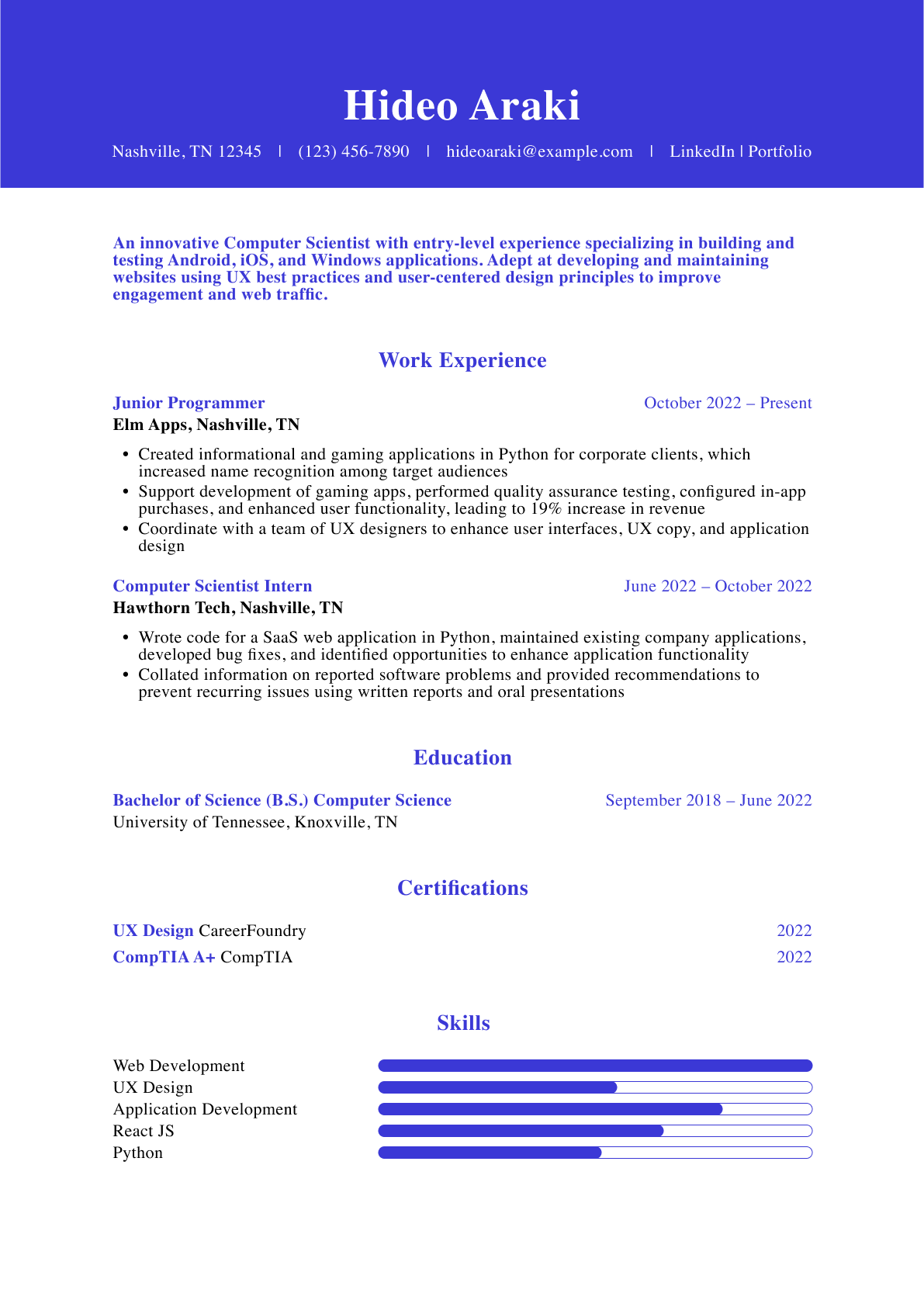
Here’s an example of multiple certifications on a resume:
Certifications
Project Management Professional (PMP)
Project Management Institute | Expires March 2027
Certified ScrumMaster (CSM)
Scrum Alliance | Earned June 2024
AWS Certified Solutions Architect – Associate
Amazon Web Services | Expires September 2027
ITIL 4 Foundation
PeopleCert | Earned October 2024
Certifications & Licenses
Here’s how to list certifications paired with professional licenses:
Certifications & Licenses
- Registered Nurse (RN) | New York State Education Department | License active
- Basic Life Support (BLS) | American Heart Association | Expires August 2027
- Certified Emergency Nurse (CEN) | Board of Certification for Emergency Nursing | Expires December 2027
How to List In-Progress Certifications on a Resume
You can list a certification that you’re actively pursuing if it’s relevant to the job, but clearly label it as in progress or pending. Include the certification name, issuing organization, and expected completion date when known.
When to Include an In-Progress Certification
An in-progress certification can strengthen your resume when it supports your qualifications for the position or shows that you’re developing a skill the employer values. It’s especially useful when the job description lists the certification as preferred or when the credential supports a career change.
Consider including it when:
- You’re actively completing the required coursework or preparation.
- You’ve registered for an upcoming certification exam.
- You have a scheduled exam date or expected completion date.
- The certification is directly relevant to the position.
Avoid listing a certification if you haven’t started working toward it. Simply planning to pursue a credential doesn’t make it an in-progress certification.
How to Format an In-Progress Certification
When listing in-progress certifications, use clear language such as “In Progress, Expected [Month Year],” or “Exam Scheduled: [Month Year]” to show the credential hasn’t been earned yet.
For example:
Certifications
- Project Management Professional (PMP) | Project Management Institute | In Progress | Expected June 2027
- AWS Certified Solutions Architect – Associate | Amazon Web Services | Exam Scheduled: May 2027
High-Value Certifications by Industry
There’s no single best certification for every resume—the best certification supports your target role and matches the employer’s requirements or preferred qualifications. Use the examples below as a starting point when deciding which credentials to highlight.
Business, HR, & Finance
Employers in business, HR, and finance value credentials that show specialized knowledge or hard skills and proficiency with widely used business tools and practices.
Credentials can also help show expertise in areas such as accounting, human resources, financial management, and customer relationship management.
Popular certifications and credentials include:
- Certified Public Accountant (CPA)
- SHRM Senior Certified Professional (SHRM-SCP)
- Salesforce Certified Platform Administrator
- Certified Financial Planner (CFP)
- Chartered Financial Analyst (CFA)
Healthcare & Nursing
Healthcare employers often prioritize credentials that verify professional qualifications, clinical skills, safety training, or specialized knowledge.
Requirements vary by role and state, so candidates should prioritize the licenses and certifications specifically required or preferred for their target position.
Popular certifications, licenses, and other credentials include:
- Registered Nurse (RN)
- Licensed Practical Nurse (LPN)
- Basic Life Support (BLS)
- CPR Certification
- Certified Medical Assistant (CMA)
- Certified Nursing Assistant (CNA)
- Certified Emergency Nurse (CEN)
IT & Cloud Computing
IT employers often expect credentials that demonstrate knowledge of specific technologies or expertise in areas such as networking, cloud computing, cybersecurity, and technical support.
Industry-recognized certifications can be especially useful when they match the technologies and skills listed in a job description.
Popular certifications include:
- CompTIA A+
- CompTIA Network+
- CompTIA Security+
- AWS Certified Solutions Architect – Associate
- Microsoft Certified: Azure Administrator Associate
- Cisco Certified Network Associate (CCNA)
- Certified Information Systems Security Professional (CISSP)
Project Management & Operations
Employers in project management and operations look for credentials that demonstrate knowledge of project planning, process improvement, risk management, and established management methodologies.
Popular certifications include:
- Project Management Professional (PMP)
- Certified Associate in Project Management (CAPM)
- Certified ScrumMaster (CSM)
- PRINCE2 Foundation
- Lean Six Sigma Green Belt
- Lean Six Sigma Black Belt
Tip!
Tip!
Run your updated resume through an ATS Resume Checker to make sure headings, sections, and other key information are being read correctly. A clean, machine-readable structure can help ensure your resume content is parsed as intended.
Key Takeaways
- Focus on relevance. Match the certifications on your resume to the job posting and prioritize credentials that support the qualifications the employer is seeking.
- Know the difference between credentials. List professional certifications, licenses, and certificates accurately rather than using the terms interchangeably.
- Choose placement strategically. Give the most important credentials greater visibility based on how critical they are to performing the job from day one.
- Keep your resume focused. Remove outdated or unrelated credentials that don’t strengthen your qualifications for the position.
- Use accurate details. Include the official certification name, issuing organization, and relevant dates. Double-check expiration dates and acronym expansions.
- Be transparent about in-progress credentials. Clearly label certifications you’re pursuing or exams you have not yet completed.
- Make certifications ATS-friendly. Use simple, consistent, machine-readable formatting so recruiters and applicant tracking systems can easily identify your credentials.
Frequently Asked Questions
How many certifications should I list on my resume?
List three to five of your most relevant certifications when you have multiple credentials that directly support the job. If you have fewer, list the relevant ones rather than adding unrelated credentials to reach a target number. For highly specialized roles, you may include more if the certifications matter to the position. Remove outdated or low-value credentials that add clutter.
Do online certificates count as certifications?
Online certificates from platforms such as Coursera, Udemy, and LinkedIn Learning generally don’t count as professional certifications. They typically show that you completed a course or training program rather than passed an industry-standard certification exam.
You can still list relevant certificates on your resume, especially when they demonstrate job-related skills, but label them accurately as certificates or courses, not certifications.
Do certifications look good on resumes?
Certifications can look good on resumes when they’re relevant to the job and show the skills or knowledge an employer is seeking. They can strengthen your qualifications, particularly when a certification is required or preferred in the job posting or helps demonstrate expertise that isn’t obvious from your education or work history.
What are the top five certifications?
There’s no universal list of the top five certifications to put on a resume for every career, because the most useful credential depends on the industry and job.
Widely recognized examples include PMP for project management, CISSP for cybersecurity, AWS Certified Solutions Architect for cloud computing, CPA for accounting, and SHRM-CP for human resources. The best certification for your resume aligns with your target role.
How do I list certifications if I’m changing careers?
If you’re changing careers, list certifications that support your new career path and demonstrate relevant skills or knowledge that may not appear in your previous work history.
Highlight credentials that match the target job’s requirements, and consider placing especially relevant certifications where they’re easy to find. You can also connect them to transferable skills in your professional summary or work experience.
Craft your perfect resume in minutes
Get 2x more interviews with Resume Builder. Access Pro Plan features for a limited time!